how-to
Community
APIs
HERE Routing APIs: Developer Insights & Best Practices
Piyush Pelagade — 15 June 2026
7 min read
06 January 2026
Building websites has evolved dramatically since the AI revolution of 2022. With chatbots and AI-assisted coding becoming mainstream, creating a functional site today is easier than ever. But what about adding advanced features like maps?
Recently, I revisited one of our older videos on this topic and asked myself: How simple is it to integrate HERE Maps into a website in 2026?
In this blog post, we will explore what it takes to add HERE Maps to your site today. We will start by summarizing the original video from 2020, then use an AI chatbot to generate HERE Maps integration code based on those requirements. Finally, we will review the chatbot’s output - highlighting what works, what does not, and how to improve the code for a seamless solution.
Since I have access to the video transcript, I decided to use my M365 Copilot AI chatbot to summarize it instead of watching the entire video again.
Summary of Twitch Home Office Hours Episode
Topic: Adding HERE Maps to a website (example: “Cat & Bigfoot” boutique site)
Key Points:
Context:
The session demonstrates how to progressively add mapping features to a simple HTML site using HERE APIs.
Initial Setup:
Starts with a basic Bootstrap-based website without any mapping functionality.
Step 1 – Static Map:
Uses
HERE Map Image API
to embed static maps via <img> tags. Parameters include address details and optional styling (e.g., “dreamworks” psychedelic theme).
Step 2 – Interactive Map:
Adding a <div> container for the map.
Loading HERE JS libraries and CSS.
Initializing the map with latitude/longitude and adding markers.
Introduces
HERE Maps API for JavaScript
for dynamic maps. Covers:
Step 3 – Info Bubbles:
Enhances interactivity by adding clickable markers with info bubbles showing address and hours.
Step 4 – Routing:
Retrieves user location via browser geolocation.
Calculates routes to multiple store locations.
Highlights the closest store based on travel time.
Draws polyline routes on the map.
Implements routing using HERE Routing API:
Optimization:
Discusses code improvements (arrays, loops, async/await) and performance considerations.
Extras:
Mentions customization options (icons, styles), turn-by-turn directions, and potential email integration for personalized routes.
Resources:
Points to HERE documentation, GitHub examples, and developer portal for API keys.
Tone & Style: Informal, humorous, with side discussions (book recommendations, food, gaming). Emphasizes simplicity for beginners while hinting at advanced features.
I had almost forgotten about the option of building static maps, but it is still available and very useful for simple use cases. If you want to explore this feature, check out the official guide.
When I asked my chatbot for an example, it returned a snippet using an outdated version of the HERE Map Image API
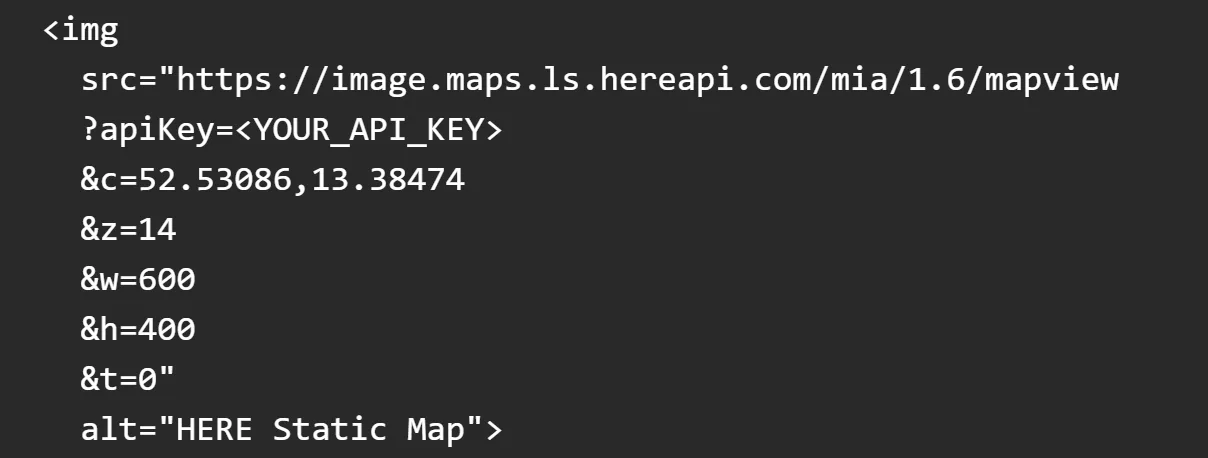
According to the latest specifications, the correct request format is:
By updating the request string almost completely, I transformed a broken <img> into a working static map. Here is the result:
HTML<div style="width:800px; height:400px;"><img src="https://image.maps.hereapi.com/mia/v3/base/mc/ center:52.53086,13.38662;zoom=12/800x400/ png?apiKey={YOUR_API_KEY}" alt="Static HERE Map"></div>
HERE Maps Static map in the website
Not the best vibe coding experience so far, but there is a positive side: I quickly found the correct information on the HERE Documentation page. I also appreciate that the chatbot’s “vibe code” serves as a ready-made template, which I can adapt by plugging in the latest request URLs.
Still, there are a few things you need to know when building a static map in 2026. Let us take a look at the full vibe code example next.
While thinking about this, I realized I have asked for a vibe-coded map before. This time, I combined Step 2 (Interactive Map), Step 3 (Info Bubbles), and Step 4 (Routing) from a Summary of Twitch Home Office Hours Episode into a single prompt - and the result was fascinating at first glance.

First vibe-coded HERE map in 2026
The functionality is there, and it seems we have completed our task of adding a map to the website. But have we really?
As an experienced HERE web map creator, I noticed the map was using the old Miami style, which is tied to the WebGL/Tangram rendering engine. The new default style is Explore, introduced with Maps API for JavaScript 3.2.0.0, which uses HARP as the rendering engine. And yes, the vibe-coded <script> tags were still pointing to version 3.1, so I manually updated them to 3.2.

This change unlocks additional features such as Satellite view, Traffic conditions, and Traffic incidents in the view panel.
I also noticed a popup appearing when the map loaded initially. The user location was retrieved as expected, but the closest route was not highlighted. Why? Possibly because the example uses U.S. locations while I work from a location in Europe.

Geolocation alert
To verify, I tested with a dummy location. After an hour of troubleshooting, I concluded: go directly to the source. HERE Docs are more reliable than the Office 365 chatbot. For example, here is a working route display tutorial: https://www.here.com/docs/bundle/maps-api-for-javascript-developer-guide-3.2/page/topics/switch-here-js-route-tutorial.html

Final result
At this point, the main goal - adding a map to the site – was achieved, so I decided not to continue refining the chatbot-generated code further.
During the original video back in 2020, Ray mentioned that it took him two days to build the example and he still needs to refactor his spaghetti code.
In 2026, it took me just four hours to build this example while writing this blog in parallel. Clearly, coding has become easier, and adding a map to your website is far less time-consuming than before. Of course, it still depends on your specific needs.
This experience reinforced an important point: referring to the HERE Documentation remains essential - not only for best practices but also for staying up to date with the latest API changes. AI chatbots in 2026 are helpful, but they still hallucinate and leave gaps that developers must fill.
I hope this blog inspires you and reminds you that your mapping expertise has not been replaced by AI in 2026. 😊
Happy coding in 2026!

Alberts Jekabsons
Sr. Developer Evangelist
Share article
Piyush Pelagade — 15 June 2026
Alberts Jekabsons — 28 May 2026
Piyush Pelagade — 18 May 2026
Why sign up:
Latest offers and discounts
Tailored content delivered weekly
Exclusive events
One click to unsubscribe