how-to
Community
APIs
HERE Routing APIs: Developer Insights & Best Practices
Piyush Pelagade — 15 June 2026
6 min read
12 December 2025
A friend of mine once said, “It is hard to choose a dinner for breakfast in Las Vegas,” and “You should visit Las Vegas at least once to understand what ‘many’ really means.” They were not referring to portion sizes; they were talking about the sheer number of restaurants. In some hotels, there are numerous dining options under one roof, and in a few cases, multiple restaurants located on a single floor.
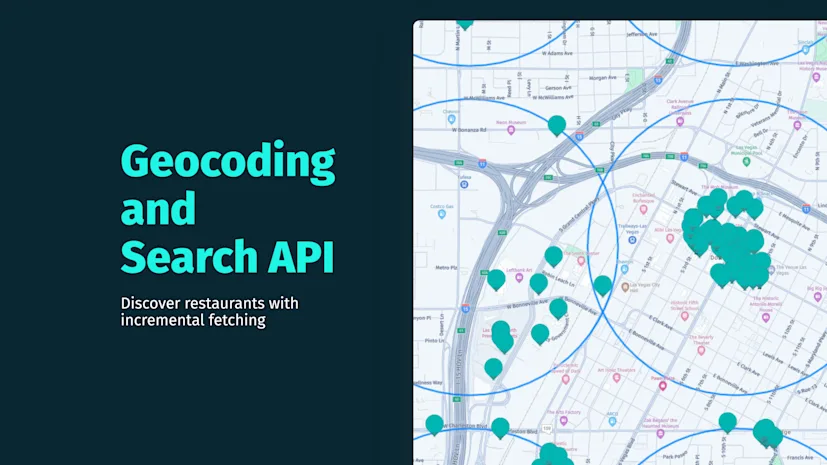
Here is the twist: I am a GIS nerd. Instead of booking a flight, I decided to let HERE API data show me what “many” really looks like. By plotting restaurant POIs across Las Vegas, I can visualize just how overwhelming the choices are—without ever leaving my desk.
There have been blog posts about HERE Geocoding and Search API in the past on our developer blog. I also chose HERE Geocoding and Search API as a tool for this mapping challenge.
After I quickly got started I hit a road block, as we have a meaningful limit of returned results.
The HERE Geocoding and Search API provides two parameters for controlling the number of results:
limit: Specifies the maximum number of items returned per request.
Default: 20
Maximum: 100
offset: Indicates the starting position for the next batch of results.
At first glance, these parameters seem ideal for retrieving all POIs in a given area. Initially, it was assumed that if the API response indicated thousands of results (e.g., 5,000 restaurants), we could simply use offset to paginate through them—starting at 20, then 120, and so on.
However, this assumption is incorrect, and I will show you why.
Initially, I tried combining POIs by increasing the offset value, assuming this would let me paginate through all results in the area. For example:
# First page offset is 0
https://discover.search.hereapi.com/v1/discover?in=circle:36.1699,-115.1398;r=10000&q=restaurant&limit=100&offset=0&apiKey=<YOUR_API_KEY># Second page offset is 100
https://discover.search.hereapi.com/v1/discover?in=circle:36.1699,-115.1398;r=10000&q=restaurant&limit=100&offset=100&apiKey=<YOUR_API_KEY>Why this fails:
The API does not return additional results beyond the first 100 for the same query for location in=circle:36.1699,-115.1398.
offset works only within the 100 result cap, not beyond it.
The Limitation
The API enforces a hard cap of 100 results per query, regardless of the offset value. In other words, even if your area contains 5,000 restaurants, you cannot retrieve more than 100 results by just increasing offset. This design prioritizes performance and relevance, but it means developers need a different strategy for larger coverage.


Do I want more POIs on the screen!? I did - and that is why I came up with a solution - incremental search.
To make the incremental search work:
Divide your area into smaller areas (like circles in my case)
Query each area individually using the method for requesting the area (like in=circle:centerLat,centerLng;r=radius)
Aggregate results in a JavaScript's Set or Map to avoid duplicates (in cases where circles overlap)

JavaScript logic for Incremental Fetch
Incremental fetching works covering the area with POIs - following the JavaScript logic the minLat and minLng are increased incrementally by a step value where the next fetch request is made.
The incremental search extends the coverage by querying smaller regions and combining them together, increasing the number of returned POIs since each request is unique and the returned results has a maximum of 100 POIs each. In this case using a JavaScript Map Object ensures only unique POIs are kept.
JavaScript1const longitude = -115.15732257370456; //vegas2const latitude = 36.13376944363337; //vegas3      // Define bounding box for POI requesting in Las Vegas4const minLat = 36.05,5   maxLat = 36.25;6const minLng = -115.3,7   maxLng = -115.05;8
9const step = 0.02; // tile size in degrees10const radius = 1000; // 1 km radius per tile11const limit = 100;12const query = "restaurant"; //POI type13let offset = 0;14
15 async function fetchDiscoverLocation(lat, lng) {16        const url = `https://discover.search.hereapi.com/v1/discover?in=circle:${lat},${lng};r=${radius}&q=${query}&limit=${limit}&apiKey=${apiKey}`;17        const response = await fetch(url);18        const data = await response.json();19        const items = data.items || [];20
21        items.forEach((item) => {22          if (!allResults.has(item.id)) {23            allResults.set(item.id, item);24            const marker = new H.map.Marker({25              lat: item.position.lat,26              lng: item.position.lng,27            });28            marker.setData(`<b>${item.title}</b><br>${item.address.label}`);29            marker.addEventListener("tap", (evt) => {30              const bubble = new H.ui.InfoBubble(evt.target.getGeometry(), {31                content: evt.target.getData(),32              });33              ui.addBubble(bubble);34            });35            markerLayer.addObject(marker);36          }37        });38      }39
40      async function fetchAllPOIs() {41        const promises = [];42        for (let lat = minLat; lat <= maxLat; lat += step) {43          for (let lng = minLng; lng <= maxLng; lng += step) {44            promises.push(fetchDiscoverLocation(lat, lng));45            const circle = new H.map.Circle(46              { lat: lat, lng: lng },47              radius, // radius in meters48              {49                style: {50                  strokeColor: "rgba(0, 128, 255, 0.7)", // outline color51                  lineWidth: 4, // outline width52                  fillColor: "rgba(0, 0, 0, 0)", // fill color transparent53                },54              }55            );56
57            // Add the circle to the layer instead of the marker58            requestCenterPointMarkerLayer.addObject(circle);59          }60        }61        await Promise.all(promises); // Run all requests in parallel62        console.log(`Total unique POIs: ${allResults.size}`);63      }64
65      fetchAllPOIs();66
Try adjusting step (distances between the center points) and radius for number of POIs on the screen. With this you can test the performance vs. coverage to hit the sweet spot for your application.
The circular areas are visualized using H.map.Circle setting the fill color to completely transparent "rgba(0, 0, 0, 0)"
The best practice for adding markers to your HERE Map is to create a group just like with default markers and add the circle group to the map.
JSconst requestCenterPointCircles = new H.map.Group();map.addObject(requestCenterPointCircles);
In function fetchAllPOIs() create circles and add to the circle group
JavaScriptconst circle = new H.map.Circle( { lat: lat, lng: lng }, radius, // radius in meters { style: { strokeColor: "rgba(0, 128, 255, 0.7)", // outline color lineWidth: 4, // outline width fillColor: "rgba(0, 0, 0, 0)", // fill color transparent }, } );// Add the circle to the layer instead of the markerrequestCenterPointCircles.addObject(circle);When implementing incremental search, performance matters—especially for large areas with many points, as shown in the example above. Fetching position sequentially can be slow, so here is one key optimization:
Instead of fetching discover requests one by one, use Promise.all() to send multiple requests at once. This significantly reduces total execution time:
await Promise.all(promises); // Run all requests in parallelThis approach ensures that all requests are processed concurrently, making your POI loading much faster.

Finally, I got what I came for - the feel of 'many' in Las Vegas.
Happy coding, and see you in the next one!
For more details, check out:

Alberts Jekabsons
Sr. Developer Evangelist
Share article
Piyush Pelagade — 15 June 2026
Alberts Jekabsons — 28 May 2026
Piyush Pelagade — 18 May 2026
Why sign up:
Latest offers and discounts
Tailored content delivered weekly
Exclusive events
One click to unsubscribe