how-to
HERE documentation MCP in practice: a walkthrough with Kiro
Piyush Pelagade — 14 September 2026
4 min read
09 September 2026
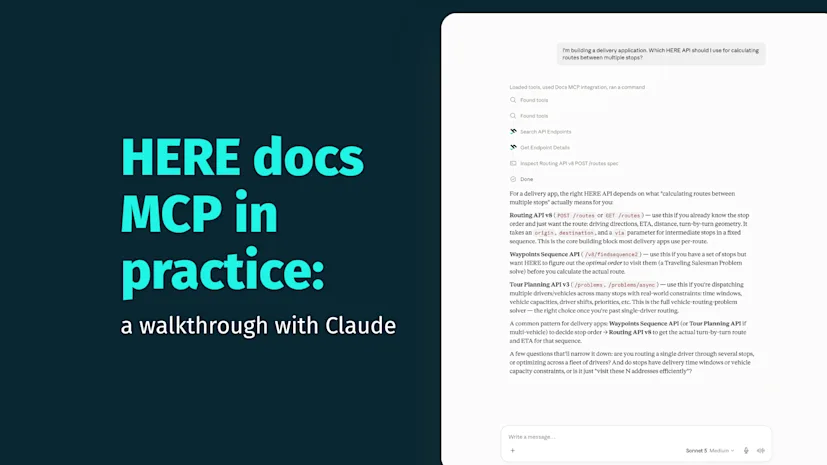
Last month, we introduced the HERE documentation MCP. Now let's see what it looks like in a real development workflow. In this blog post, we'll use Claude to build part of a delivery routing application using documentation retrieved directly from the HERE documentation MCP.
Connect the HERE documentation MCP in Claude desktop using these setup instructions. Once connected, open a new conversation and you're ready to go.

Most development doesn't start with "generate this code". It starts with a prompt containing a question:
Prompt:
I'm building a delivery application. Which HERE API should I use for calculating routes between multiple stops? |
|---|
Claude can then retrieve the relevant documentation to ground its answer, pointing to the Routing API and explaining what it covers.

Notice what's happening: Claude isn't searching the web. It's retrieving information directly from the HERE documentation MCP, giving it access to the same official documentation you'd normally open in your browser.
Prompt:
Generate a JavaScript example that calculates a route from Chicago to St. Louis using the HERE Routing API |
|---|
Claude uses the HERE documentation MCP to retrieve the HERE Routing API documentation, using it to identify the endpoint, required parameters and authentication method. Using this information, it generates accurate JavaScript code.

The result is a working request built around real Routing API v8 parameters transportMode, origin, destination and a return value listing which fields to include in the response:
const params = new URLSearchParams({  transportMode: "car",  origin,      // "41.8781,-87.6298" — Chicago, IL  destination, // "38.6270,-90.1994" — St. Louis, MO  return: "summary,polyline,actions,instructions",  apiKey: HERE_API_KEY,});
const url = `https://router.hereapi.com/v8/routes?${params.toString()}`;const response = await fetch(url);// ...
Prompt:
Explain what each response field means |
|---|
It explains fields such as "sections", "distance" and "duration", using the descriptions of these fields found in the documentation.

This is where the workflow becomes more interesting. Instead of starting over with a new prompt, you continue the conversation just as you would with another developer.
Prompt:
Update the example to avoid toll roads |
|---|
It will retrieve the relevant HERE Routing API documentation before updating the example adding the real parameter for it, avoid[features]=tollRoad.

Prompt:
Surface any traffic incidents along the route and add proper error handling for a failed request |
|---|
Claude will then refine the implementation while adding an incidents field to the response handling and wrapping the request in proper error handling.

From here, the same pattern holds for further follow-ups like:
Add waypoint support
Return alternative routes
Convert the example to Python
Switch to transportMode: "truck" for delivery-specific routing restrictions
Each of these allows Claude to retrieve the relevant documentation as needed, helping keep the implementation aligned with the latest HERE API documentation instead of relying only on earlier context in the conversation.
While the HERE documentation MCP helps ground AI-generated responses in official documentation, you should still test generated code against your application and the live HERE APIs before deploying it.
Start with a question, not a code request:
I'm building [your use case]. Which HERE API should I use and how do I get started? |
|---|
Then keep going and ask Claude to generate an example, explain the response, change parameters or troubleshoot your own implementation. Because the conversation stays connected to the HERE documentation MCP, you spend less time cross-referencing docs and more time building.
More workflows featuring other AI coding assistants and more advanced HERE APIs are coming in future posts.
(This post is not affiliated with, sponsored by, or endorsed by Anthropic. Claude, Claude Desktop and related marks are trademarks of Anthropic, PBC.)

Piyush Pelagade
Share article
Piyush Pelagade
Piyush Pelagade — 14 September 2026
Piyush Pelagade — 21 August 2026
Piyush Pelagade — 04 August 2026
Why sign up:
Latest offers and discounts
Tailored content delivered weekly
Exclusive events
One click to unsubscribe