
Release notes
Oct 2026 Platform Release Notes
Mohini Todkari — 23 October 2026
6 min read
12 August 2026
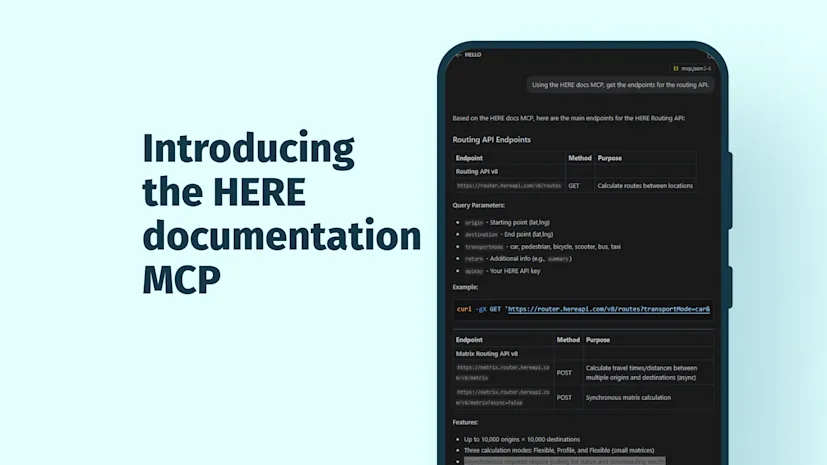
AI coding agents can help you move faster, but only when they have the right context. When you’re building with HERE, that means giving coding agents access to the same official docs you rely on: guides, API references, data specs and changelogs. To help you get the most dependable results from your AI coding agent, we’re making these docs available from the HERE documentation MCP, now available at https://docs.here.com/mcp.
The HERE documentation MCP gives your AI coding agent direct access to official HERE documentation. Instead of relying on incomplete examples or outdated information, your coding agent can use authoritative, up-to-date HERE documentation to support more accurate code generation, integration guidance and troubleshooting.
Use the HERE Documentation MCP to connect your AI coding agents with official HERE docs, so they can work with trusted product information in context.
If you’re using AI assistants in your workflow, you know they’re most helpful when they can ground their responses in current documentation. The HERE documentation MCP provides this grounding by providing AI coding agents access to:
Developer guides to help coding agents understand workflows, setup steps, and implementation patterns
API references to give coding agents the endpoints, parameters, schemas and behavior needed for accurate integration support
Data specifications to clarify the structure, format, and expected usage of HERE data
Changelogs to show what has changed, so your agent can better reflect the latest product updates and assist in updating existing code to the latest specification
The result is a better developer experience: less time searching, less guesswork and more confidence that your AI-assisted output is accurate. Look for future developer blog posts that show you how.
The HERE documentation MCP exposes a set of tools your AI coding agent can use to find the right HERE documentation context while you work:
list-endpoints — Returns all documented API paths and HTTP methods with summaries for HERE APIs like Geocoding & Search, Routing and map rendering APIs
get-endpoint — Returns full details for one endpoint, including parameters and schemas
search-specs — Runs a case-insensitive search of API references across paths, operations and schemas.
list-specs — Lists all API specs available to the MCP
search — Runs full-text search across documentation pages and returns page IDs for relevant pages, which can then be used with fetch to get the page content.
fetch — Returns the full content of a documentation page by ID. Use search to get the page ID first.
Best results come when AI agents can combine your project context with official HERE documentation. The MCP supplies that trusted documentation. |
|---|
Imagine you’re adding route planning to a delivery application with the HERE Routing API. Instead of leaving your IDE to find the right endpoint, request parameters, transport modes, route options, response fields and latest usage notes, your AI coding agent can query the HERE documentation MCP for official guidance. It can then suggest implementation steps, generate a sample request for finding a route between pickup and drop-off locations and explain relevant response properties such as distance and travel time. Because the answer is grounded in HERE documentation, you get more accurate support while staying in your development flow, so you can move from exploration to working code faster.
Look for upcoming HERE developer blog posts that walk you through additional ideas on how to get the most from the HERE documentation MCP.
Trusted documentation makes AI assistance more useful, more relevant and more actionable for real development work. |
|---|
The HERE documentation MCP server is at https://docs.here.com/mcp. Refer to your AI tool’s documentation for specific instructions on connecting to an MCP. For example:
VS Code mcp.json
{ "servers": { "here-docs": { "url": "https://docs.here.com/mcp", "type": "http" } }}There may be additional steps needed to activate and configure MCPs in your AI tool. Refer to your AI tool’s documentation for more information.
Testing Your MCP Setup
Once configured, you can test your AI assistant’s connection to the HERE documentation MCP server:
Open your AI coding assistant.
Start a new chat with the AI assistant.
Ask: “List the tools available from the HERE documentation MCP server.” You should see these tools listed:
list-specs
fetch
get-endpoint
list-endpoints
search
search-endpoints
Ask about HERE APIs. Try questions like:
Using the HERE documentation MCP server, tell me how to get an API key for the HERE Matrix Routing API.
Using the HERE documentation MCP server, create a React component that displays a map.
Using the HERE documentation MCP server, show me the code for an API request to get a route from Chicago to St. Louis.
Give it a try in your developer productivity tool of choice and stay tuned for a follow-up on practical use cases using common agent/coding assistants.
You can check-out the knowledge base article for more information.

HERE Technologies
Share article
HERE Technologies
Why sign up:
Latest offers and discounts
Tailored content delivered weekly
Exclusive events
One click to unsubscribe