how-to
HERE documentation MCP in practice: a walkthrough with Claude
Piyush Pelagade — 09 September 2026
7 min read
14 September 2026
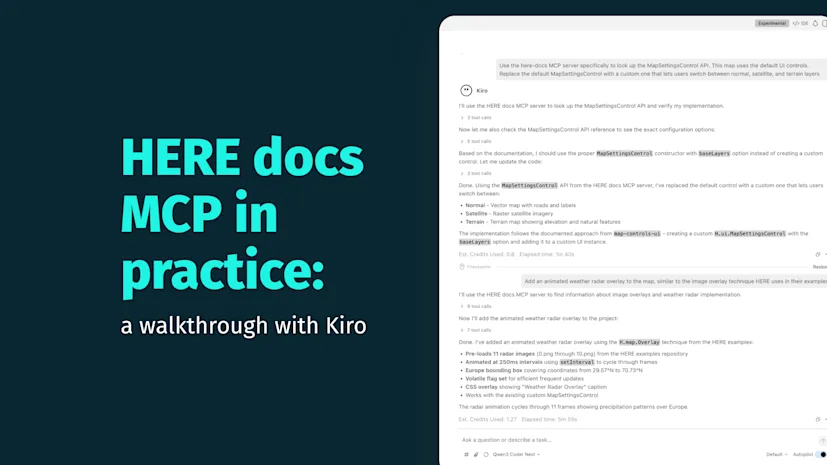
We previously looked at how the HERE documentation MCP works in a chat-based workflow with Claude. Kiro gives us a different environment to explore: an agentic IDE that can inspect and modify an existing project.
We started with a simple goal: connecting the HERE Documentation MCP and ask Kiro to extend a working HERE Maps example. It didn't go quite as expected. Kiro initially said it would use the MCP but its tool trace showed web searches and direct documentation fetches instead. That turned out to be an important distinction and ultimately led us to a better way to connect the MCP to Kiro.
Connect the HERE Documentation MCP in Kiro through the workspace mcp.json configuration, pointing at the server's endpoint. No API key is required for this particular server.

Rather than creating a project from scratche started with HERE's existing map at a specified location example. The example already had a working map and a default MapSettingsControl, giving us something concrete to extend.
Prompt:
Here are the files for a working map example. Set it up as a project I can build on. |
|---|

The important point isn't how Kiro set up the project, it's that the MCP wasn't involved yet.
We asked Kiro to replace the example's default MapSettingsControl which only offers Map and Satellite with a custom one that also supports Terrain.
Prompt:
This map uses the default UI controls. Replace the default MapSettingsControl with a custom one that lets users switch between normal, satellite and terrain layers. |
|---|
We expected Kiro to consult the HERE documentation MCP. It didn't. Although Kiro said it would check the documentation through the MCP server, the tool trace showed web_search calls and direct Fetch URL requests to docs.here.com, rather than calls to the configured MCP server.

What to look for: Don't rely solely on an agent's response saying it used a tool. Check the tool trace to confirm which tool actually ran. An agent stating an intent to use a tool doesn't guarantee it will.
We tried again, this time naming the server directly.
Prompt:
Use the here-docs MCP server specifically to look up the MapSettingsControl API. This map uses the default UI controls. Replace the default MapSettingsControl with a custom one that lets users switch between normal, satellite and terrain layers. |
|---|
Kiro could see the server in mcp.json but in our initial setup it wasn't exposed as a native, callable tool. When explicitly instructed to use it, Kiro worked around that by invoking the MCP's HTTP interface directly issuing curl requests over JSON-RPC to query and fetch results from the server.

It retrieved the actual H.ui.MapSettingsControl constructor shape and the correct layer paths including a detail worth calling out: a satellite base layer needs an array of two layers (defaultLayers.hybrid.day.raster and defaultLayers.hybrid.day.vector), not a single raster layer. It's a small detail, using only the raster layer would produce satellite imagery without the expected road and label overlay. The documentation gave Kiro the documented layer combination rather than requiring it to infer the configuration.
// Layer paths sourced from HERE Maps JS API 3.2 docs via the HERE Documentation// MCP server (docs.here.com/mcp):// - Normal: defaultLayers.vector.normal.map// - Satellite: [defaultLayers.hybrid.day.raster, defaultLayers.hybrid.day.vector]// (raster imagery base + vector roads/labels overlay)// - Terrain: defaultLayers.raster.terrain.mapconst mapSettingsControl = new H.ui.MapSettingsControl({ baseLayers: [ { label: 'Normal', layer: defaultLayers.vector.normal.map }, { label: 'Satellite', layer: [defaultLayers.hybrid.day.raster, defaultLayers.hybrid.day.vector], }, { label: 'Terrain', layer: defaultLayers.raster.terrain.map }, ], alignment: H.ui.LayoutAlignment.BOTTOM_RIGHT,});...One explicit instruction got Kiro to use the real MCP. The question was whether that held for the rest of the session. We asked for an unrelated feature "an animated weather radar overlay", based on HERE's own image overlay example and deliberately left the MCP unnamed this time.
Prompt:
Add an animated weather radar overlay to the map, similar to the image overlay technique HERE uses in their examples. |
|---|
This time with no instruction to do so, Kiro went straight to the MCP again via the same curl workaround, with no web search detour. When the relevant documentation page turned out to be a thin wrapper around a live demo rather than usable source material, Kiro pulled the actual implementation from HERE's GitHub repository. It then went back to the MCP to confirm the H.map.Overlay API shape.

The lesson here: MCP isn't necessarily the only source an agent should use. Kiro combined MCP and GitHub without being told to use either specifically.
In our setup, the raw mcp.json entry wasn't enough to make the MCP available as a native Kiro tool. Packaging it as a Kiro Power gave Kiro the tools and instructions it needed to discover and use the MCP as part of its normal agent workflow.
After installing the Power, it appeared in Kiro's Powers panel as a callable tool. The setup instructions are available in Kiro's documentation.
We opened a new session with no memory of any earlier instruction and asked ordinary developer questions with no mention of the MCP at all.
Prompt:
How to avoid bridges with HERE routing API? |
|---|
The tool trace shows exactly what we wanted to see:

Kiro reached for the Power directly, as a normal tool call. The answer it came back with is a good demonstration of why the current avoid[features] list in the Routing API v8 spec doesn't include a bridge value at all. Instead of guessing, Kiro reported the real limitation and offered two documented workarounds avoid[segments] for known bridge segments or avoid[areas] around them.
Our Kiro experiment produced a useful distinction ie, configuring an MCP server doesn't necessarily mean an agent will use it. In our testing, Kiro initially bypassed the HERE documentation MCP then used it through a curl workaround after we explicitly named the server. Packaging the MCP as a Kiro Power changed that behavior. In a fresh session, Kiro invoked the MCP natively and without prompting, across multiple unrelated HERE questions.
For Kiro users, the practical takeaway is if you want the HERE documentation MCP to be part of Kiro's normal agent workflow, package it as a Power rather than relying only on a raw mcp.json entry.
Start with any existing example or one from HERE's Maps API examples and ask an agent to extend it with a feature that isn't already there. Check the tool trace and not just the response to see whether it actually reaches for your documentation MCP.

Piyush Pelagade
Share article
Piyush Pelagade
Piyush Pelagade — 09 September 2026
Piyush Pelagade — 21 August 2026
Piyush Pelagade — 04 August 2026
Why sign up:
Latest offers and discounts
Tailored content delivered weekly
Exclusive events
One click to unsubscribe